Chances are, someone's already tested that material.
Find their settings. Start smarter.
You picked up a new material you've never run before. Or you saw someone's project in a group and want to recreate it on your machine. Either way, the answer is buried across forum threads, Discord servers, and supplier PDFs — if it exists at all. Laser Settings Hub is a community reference library where those settings are organized, searchable by your machine and material, and labeled by source — so you know what you're working with before you touch your laser.
Start free today. Upgrade to Supporter for unlimited materials, exports, and more.
See it in action
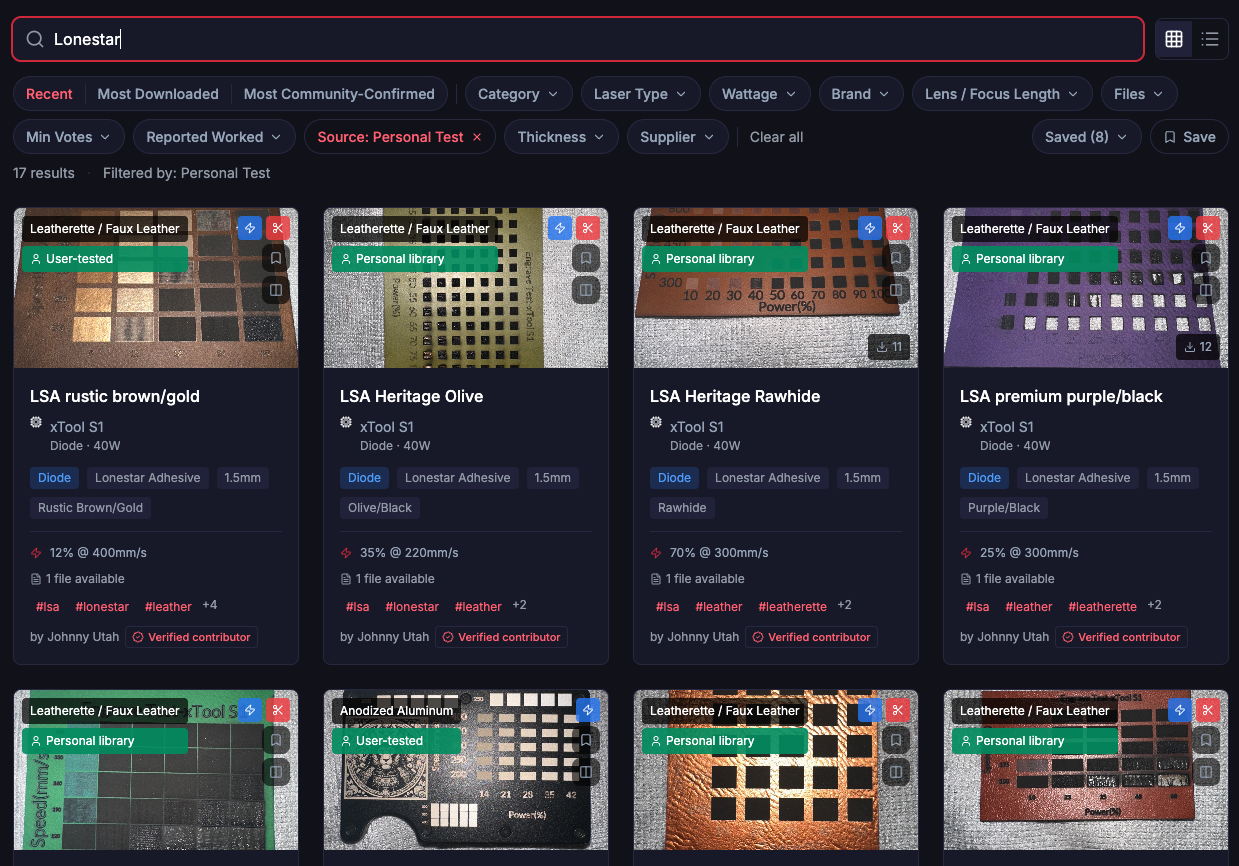
Real settings shared by the community — with source labels, test grid photos, and votes from other makers.
Why this beats a Google search
Filter to your machine
Every entry shows the machine type, wattage, and brand. Filter by your laser before you look at a single setting — so the settings you're looking at actually come from a machine that works like yours.
Know what you're looking at
Every setting is labeled by source: supplier reference, personal test, or community report. These aren't equivalent, and we don't present them as if they are. You can judge the setting before you rely on it.
Community feedback, not just a comment section
Other makers vote on whether a setting worked, needed adjustment, or was off entirely. You can see the breakdown and sort by most community-confirmed — not just the most recently posted.
The research rabbit hole is real.
Every laser enthusiast has been here...
New material, no idea where to start
You bought something you've never run before. The supplier's guide is for a machine you don't own. You post in the group and get five different answers from five different machines. You burn through material running blind test grids just to find a baseline.
You saw the project. You want the settings.
Someone posted a stunning result in your group — same laser model as yours. You asked for settings in the comments. You got “it depends” or a vague range with no material context, no thickness, no air assist note. Nothing you can actually use.
Forum advice with no machine context
You find a thread with five different settings from five different users on five different machines. You have no idea how much to adjust, or whether the person who posted it ever ran it twice.
What you can do today
Built by laser users, for laser users. These are the features that are live and shipping.
Photo upload
Snap a photo of your test results right from your phone. See exactly what each setting produced — no more guessing from notes.
Organize by material + machine
Sort by material type, supplier, thickness, and laser machine. Find the setting you need in seconds instead of scrolling.
Mobile-first
Designed to work at the machine. Pull up settings on your phone, tablet, or desktop — wherever you are when you need them.
Provenance badges on every entry
Every setting in the public library is labeled: personal test, supplier reference, or community reference. These aren't equivalent, and we don't pretend they are.
Sort by community confidence
Filter by “Most Community-Confirmed” to surface settings that multiple makers have reported working. Each entry shows the vote breakdown so you can judge for yourself.
Machine match comparison
On any public setting's detail page, see how the poster's machine compares to yours — laser type, wattage, and brand — so you can quickly decide whether a setting is relevant to your setup before you go any further.
Bookmarks + saved searches
Save public library settings to your personal collection and store filter presets for instant recall. Supporter and Team feature — no rebuilding the same query twice.
LightBurn .clb export
Find a setting in the community library, download it as a .clb, and load it straight into LightBurn — no retyping, no transcription errors. Works for individual settings and your full private library.
Team Workspaces
Share a private library across your shop or makerspace, and publish settings under a branded team page. Roles, permissions, and an audit trail included. Team feature.
Build your test grid in seconds, not sessions.
Once you've found a starting point in the community library, most people take that setting into LightBurn and manually build a test grid — adjusting power and speed in increments until they find the sweet spot. That works. But it takes time, and if your increments are wrong you burn through expensive material before you get there.
The Test Grid Generator does that setup for you, free for every account. Give it a starting point, set your range and step size, and get a ready-to-run grid you can import straight into LightBurn. Less setup, less waste, faster path to your ideal settings.
Browse the libraryGet better laser settings guidance in your inbox
Practical notes on testing materials, documenting settings, and building more repeatable laser workflows.
Having trouble with the form? Subscribe on Beehiiv
Your shop's collective knowledge, in one place
Right now, your team's best settings live in spreadsheets, Discord threads, and people's heads. Team Workspaces gives you a shared private library — plus a branded public team page that shows the community what your shop has figured out.
Settings published under your team name, roles and permissions, an audit trail, and an admin dashboard. Starting at $19/month for 3 seats.
See Team pricingSimple, Transparent Pricing
Start free with unlimited community publishing and the Test Grid Generator. Supporter adds contributor tools. Team is built for shops and makerspaces.
Free
For anyone exploring the community library and starting to build their own settings library.
- Full public library access — browse and download, no cap
- Unlimited publishing to the community library
- Test grid generator (.lbmt LightBurn preset)
- Up to 20 private materials
- Up to 10 bookmarks
- LightBurn .clb export
- Standard support
Supporter
or $49/year (save $11)
For contributors who want a badge, deeper discovery tools, and a larger private reference library.
- Supporter badge — shown on your profile and published settings
- Unlimited private materials
- Unlimited bookmarks + saved searches
- Side-by-side material comparison (up to 4)
- Front-of-queue email support
$5/month or $49/year. Cancel anytime.
Team
or $189/year (save $39)
For makerspaces, laser studios, and shops that share a collective settings library.
- Everything in Supporter
- Branded team page — publish settings under your shop name
- Shared private library across team members
- Roles & permissions (admin/editor/viewer)
- Audit trail (who changed what)
- Admin dashboard (usage & adoption)
- 3 seats included (+$5/user for more)
$19/month or $189/year. Cancel anytime.
Frequently asked questions
Do I need an account to browse the community library?
No. The public library is open to everyone without an account. Create a free account to save settings to your private library, bookmark entries, and publish your own settings to the community.
What's the difference between Free and Supporter?
Free lets you browse and download the full community library, use the Test Grid Generator, publish unlimited community settings, and save up to 20 private materials. Supporter adds a Supporter badge shown on all your published settings, plus unlimited bookmarks, saved searches, and private materials.
What is Team, and who is it for?
Team is for makerspaces, laser studios, and shops that want a shared settings library. It adds a branded public team page, a shared private library, roles and permissions, an audit trail, and an admin dashboard. Starts at $19/month for 3 seats.
Can I cancel anytime?
Yes. Cancel, downgrade, or update your payment method from the billing portal at any time. No lock-in.
Is the community library useful if I have a different machine than whoever posted a setting?
Often yes — as a starting point. Every entry in the public library shows the machine type, wattage, and brand, so you can judge how much to adjust. The detail page shows a machine comparison summary alongside the setting. Treat community settings as informed starting points, not guaranteed results.
Can I export community settings into LightBurn?
Yes. Any setting in the public library can be downloaded as a .clb file and loaded directly into LightBurn. No account is required to browse, but you'll need a free account to download.
What is the Test Grid Generator?
It's a free tool, available to every account, that builds a LightBurn-ready test grid from a starting point you choose. Set your power and speed range, pick your step size, and it generates the grid for you — so you spend less time on setup and less material finding your sweet spot.
Stop searching. Start making.
The community settings you've been hunting for are already here — searchable by machine and material, labeled by source, with feedback from makers who actually ran them. Browse free, contribute your own, and use the free Test Grid Generator to dial in your settings faster.
Start free today. Upgrade to Supporter for unlimited materials, exports, and more.